
How to Adjust Hearing Aid Volume?
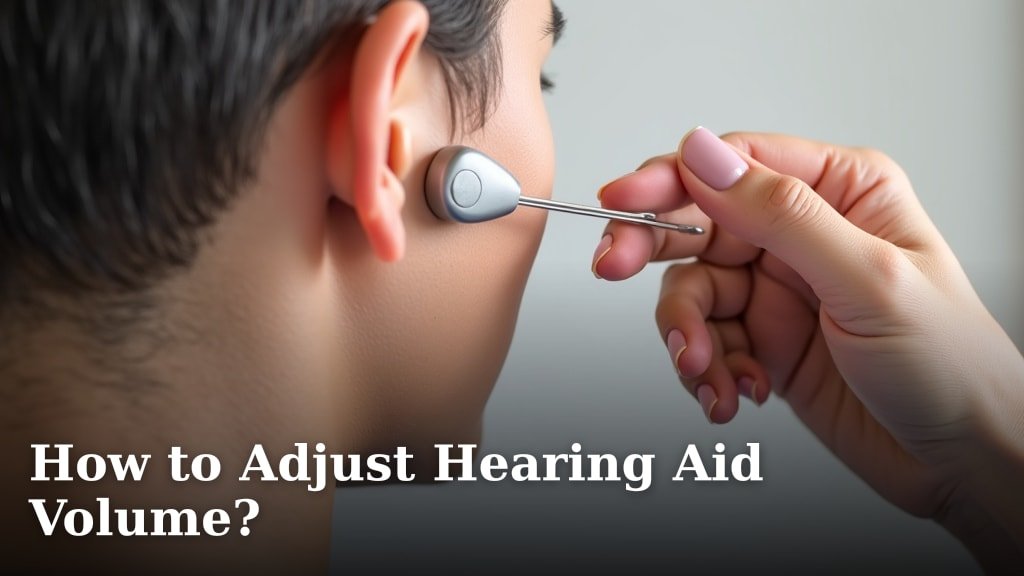
To adjust hearing aid volume, you can use the buttons on the device, a remote control, or a smartphone app. Most hearing aids offer easy ways to change the listening level. Finding your ideal volume helps you hear conversations clearly and comfortably.
We found that different hearing aid models have various controls for adjustment. Some devices respond to a simple tap, while others connect wirelessly to your phone. Understanding your specific hearing aid’s features makes volume changes less confusing. Everyone wants clear, comfortable sound.
- Volume changes happen through buttons or apps.
- Older models might use tiny knobs.
- Newer models often link to your smartphone.
- Adjust volume for different listening needs.
- Find your comfortable listening “sweet spot.”
Let’s walk through exactly how to adjust hearing aid volume, covering all the common methods and a few tips for everyday use.
Mastering Your Hearing Aid’s Volume Controls
Achieving the perfect listening level with your hearing aids is key to comfortable hearing. Many people find that adjusting the volume ensures they hear conversations clearly without feeling overwhelmed by noise.
We found that understanding the different ways to change volume helps you feel more in control of your hearing experience. It’s not just about turning it up or down; it’s about making your devices work for you in various situations.
Understanding On-Device Controls
Most hearing aids, regardless of their style, come equipped with some form of on-device control. These are usually physical buttons or rockers right on the hearing aid itself. They offer a quick and direct way to make adjustments.
You might be wondering, “Where are these buttons located?” Their placement can vary quite a bit depending on the type of hearing aid you have. We’ll explore the common locations to help you find yours.
Behind-the-Ear (BTE) and Receiver-in-Canal (RIC) Models
If you wear BTE or RIC hearing aids, you’ll typically find the volume controls on the main body of the device, which sits behind your ear. Look for a small button or a rocker switch. A rocker switch often has a “plus” side for increasing volume and a “minus” side for decreasing it.
Sometimes, a single button might control both volume and program changes. A quick press might change volume, while a longer press switches programs. Your audiologist will explain the specific function of your model’s buttons (American Academy of Audiology).
In-the-Ear (ITE) and In-the-Canal (ITC) Models
For ITE and ITC hearing aids, the controls need to fit into a smaller space. You might find a very tiny button, a discreet rocker switch, or even a small dial. These are often located on the outer shell of the hearing aid itself, facing outward.
Because of their size, these controls can sometimes be a bit trickier to manipulate. It takes a little practice to get used to the feel and make adjustments smoothly.
Completely-in-Canal (CIC) and Invisible-in-Canal (IIC) Models
In CIC and IIC models, space is extremely limited. Many of these super-compact devices don’t have on-device volume controls at all. They might rely entirely on remote controls or smartphone apps for adjustments.
If your CIC or IIC device does have a control, it’s usually a very small, almost Flush button, or a tiny pull string that also houses a control. It’s designed to be as inconspicuous as possible.
Using Remote Controls for Adjustments
Beyond the physical buttons on your hearing aids, many models come with or are compatible with a dedicated remote control. These remotes offer a more convenient way to adjust volume without touching your ears.
Remote controls are especially helpful if you find the on-device buttons too small or difficult to operate. They allow for discreet changes and often offer more functions than just volume.
Typical Remote Control Features
Most hearing aid remote controls are small, handheld devices. They often feature clear, easy-to-press buttons. You’ll usually find a “volume up” button and a “volume down” button, along with buttons for changing programs or settings.
Think of it like a remote for your TV – simple, straightforward, and effective. The benefit here is the ease of access without needing to reach behind your ear or into your ear canal.
Connectivity and Usage Tips
Your remote control connects to your hearing aids wirelessly, typically using Bluetooth or a proprietary radio frequency. Pairing is usually done by your audiologist during your fitting, so it should be ready to go.
Keep your remote control in a convenient place, like your pocket or purse. Just remember to treat it like any other electronic device – keep it safe from drops and moisture (National Institute on Deafness).
Adjusting Volume via Smartphone Apps
For modern hearing aids, smartphone apps have become an incredibly popular and powerful tool for managing your devices. This method offers a comprehensive and user-friendly interface for all kinds of adjustments, including volume.
If you’re comfortable with smartphones, this might be your preferred way to adjust your hearing aid volume. It turns your phone into a sophisticated control center for your hearing.
How Hearing Aid Apps Work
Most major hearing aid manufacturers offer a free app for both iOS (Apple) and Android devices. You download the app, pair it with your hearing aids (usually through Bluetooth), and then you have access to a range of controls.
Within the app, you’ll typically find a clear slider or up/down buttons for volume control. You can often adjust each hearing aid independently, which is a big advantage for those with asymmetrical hearing loss.
Beyond Basic Volume
The beauty of a smartphone app is that it often goes beyond simple volume changes. You might also be able to:
- Switch between listening programs (e.g., “restaurant mode,” “music mode”).
- Adjust bass and treble settings.
- Locate misplaced hearing aids.
- Monitor battery life.
- Receive remote support from your audiologist.
Many users find these additional features incredibly helpful for truly personalizing their hearing experience. It’s like having an audiology lab in your pocket.
Automatic Volume Adjustments: What to Expect
Did you know many modern hearing aids can automatically adjust their volume? This is thanks to advanced digital signal processing (DSP) and artificial intelligence. They are designed to make your life easier.
These automatic features aim to provide a comfortable listening level without constant manual input. They can be a real game-changer for moving between different sound environments.
How Automatic Volume Works
Your hearing aids contain tiny microphones that continuously analyze the sound environment. They detect whether you’re in a quiet room, a noisy restaurant, or outdoors with wind noise.
Based on this analysis, the hearing aids automatically increase or decrease the volume to optimize speech clarity and reduce background noise. It’s like having a tiny, smart sound engineer inside your ear (Mayo Clinic).
When Manual Adjustment is Still Needed
Even with advanced automatic features, there will be times when you’ll want to manually adjust the volume. No system is perfect, and your personal preferences might differ from what the hearing aid senses as “optimal.”
For example, you might prefer a slightly lower volume in a particularly loud environment even if the hearing aid is trying to boost speech. Or you might want a bit more boost for a soft speaker in a quiet room. Manual control gives you the final say.
Finding Your Ideal Listening Level
Determining the “right” volume can feel a bit like finding the princess and the pea – it needs to be just right. It’s a balance between hearing clearly and feeling comfortable. There’s no single right answer, as it’s highly personal.
Your ideal listening level will likely change throughout your day, depending on your environment, who you’re talking to, and even how tired you are. Don’t be afraid to make frequent adjustments.
Tips for Optimal Volume Adjustment
- Start in a quiet environment: Begin in a calm place and adjust until familiar sounds (like your own voice) feel natural.
- Listen for clarity, not just loudness: The goal isn’t to make everything loud, but to make speech clear.
- Increase volume gradually: Small increments are better than big jumps.
- Test in various situations: Try adjusting in a variety of places – at home, in the car, at a restaurant.
- Pay attention to fatigue: If you’re feeling tired from too much sound, lower the volume.
- Don’t be shy about adjusting: It’s your hearing, so take control.
Quick Reference: Volume Adjustment Methods
To help you remember your options at a glance, here’s a quick comparison of the common ways to adjust your hearing aid volume:
| Method | Pros | Cons |
|---|---|---|
| On-Device Buttons | Quick, direct, no extra devices needed. | Can be small, tricky for dexterity issues, less discreet. |
| Remote Control | Easy to use, larger buttons, discreet. | Another device to carry, requires batteries. |
| Smartphone App | Comprehensive control, visual interface, additional features, highly discreet. | Requires a smartphone, requires battery on both devices, can be overwhelming for some. |
| Automatic Adjustments | Effortless, seamless transitions between environments. | May not always match personal preference, less manual control. |
When to Talk to Your Audiologist
While self-adjustment is important, sometimes you might feel like your hearing aids aren’t quite right, no matter how much you tweak the volume. This is when your audiologist becomes your best friend.
Don’t hesitate to schedule an appointment if you consistently struggle to find a comfortable listening level or if you notice sudden changes in how your hearing aids perform.
Signs You Might Need Professional Help
Consider reaching out to your audiologist if you experience any of these issues:
- You’re always turning the volume up to the maximum.
- Even at maximum volume, you can’t hear conversations clearly.
- You find sounds consistently too loud, even at the lowest setting.
- Making volume changes doesn’t seem to have much effect.
- The sound quality seems distorted or unclear.
- You have difficulty understanding speech in specific environments (e.g., noisy places or while watching TV).
- Your hearing aids are suddenly much louder or quieter than usual.
Your audiologist can run diagnostic tests, recalibrate your devices, or suggest different programs to better suit your needs. They are the experts who can fine-tune your hearing experience.
Remember, optimal hearing aid performance involves both your understanding of the controls and professional programming. Don’t be shy about advocating for your best hearing.
Conclusion
You now have a clear understanding of how to manage your hearing aid volume. Whether you use on-device buttons, a remote, or a smartphone app, finding your ideal sound is crucial for comfortable listening. We found that taking control of these adjustments helps you hear better in every situation.
Don’t be afraid to experiment and fine-tune. If you ever feel stuck, reach out to your audiologist. They are your best resource for personalized adjustments and support. Your hearing journey is unique, and mastering your hearing aid volume puts you in the driver’s seat.
Frequently Asked Questions
Should my hearing aids feel too loud or too soft?
No, your hearing aids should generally feel comfortable. If sounds are consistently too loud or too soft, even after your adjustments, it indicates they might need recalibration. This is a good time to contact your audiologist.
Can I adjust the volume of each hearing aid independently?
Many modern hearing aids, especially when paired with a smartphone app, allow you to adjust the volume for each ear separately. This is very helpful if you have different degrees of hearing loss in each ear.
Why do my hearing aids sometimes change volume on their own?
Most likely, your hearing aids have automatic volume adjustments built-in. They sense changes in your environment and try to optimize sound for you. If this is disruptive, your audiologist can adjust these automatic settings.
What if tapping my hearing aid changes the volume?
Some advanced hearing aids feature “tap control” or gesture control. A gentle tap on the device can be programmed to change volume, switch programs, or answer calls. Check your user manual or ask your audiologist if your device has this feature.
How often should I be adjusting my hearing aid volume?
Adjust your hearing aid volume as often as needed to maintain comfortable and clear hearing throughout your day. Your environment and activity levels change, so your volume preferences will too. There’s no “right” number of adjustments; do what feels best for you.
