How to Use an Amplified Telephone?
On this page (5 sections)
Using an amplified telephone is straightforward and can make a big difference. You simply dial as usual, but the phone will automatically boost the sound for clearer conversations. Many models also offer adjustable volume controls right on the handset.
These phones are designed to help people with hearing difficulties. They make it easier to hear conversations without strain. We found that amplified phones for seniors often include other helpful features, like larger buttons and visual ring indicators.
- Dial like a normal phone.
- The phone boosts sound automatically.
- Adjust volume and other settings easily.
- Great for clearer conversations.
- Look for extra features like big buttons.
Let’s walk through how to use your amplified telephone step by step to make your calls easier and more enjoyable.
Getting Started with Your Amplified Phone
So, you’ve got your new amplified telephone, and you’re ready to make calling easier. That’s fantastic! Using one is pretty much like using any other phone, but with a few extra goodies designed to help you hear better. We’ve found that the biggest hurdle for many is just getting started. Let’s break it down.
Making Your First Call
The process of making a call is super simple. Think of it like dialing any number you normally would. There’s no special sequence or button to press just to get the sound boosted. It happens automatically!
Dialing Like Always
You’ll see a keypad, just like on your old phone. Punch in the phone number you want to reach. Whether it’s a landline or a mobile number, the dialing method is the same. We discovered that most users feel comfortable with this right away.
The Automatic Boost
Once the call connects, the phone’s amplification kicks in. You should notice the volume increasing naturally. It’s designed to bring out the voice on the other end. It’s not a sudden, jarring loudness, but a clear, steady enhancement.
Answering an Incoming Call
Just like making a call, answering is also straightforward. When your phone rings, you’ll see or hear it. Then, you simply pick up the handset or press the answer button.
What to Expect When It Rings
Some amplified phones have a louder ringtone than standard models. Others might have a visual indicator, like a flashing light. This is a great feature if you sometimes miss a ringing phone. We found that the visual alert is a big help for many people.
Picking Up the Receiver
Once the ringing starts, go ahead and grab the handset. If it’s a cordless model, you might press a button that says “Answer” or a green phone icon. If it’s a corded desk phone, just lifting the receiver usually does the trick.
Customizing Your Calling Experience
This is where amplified phones really shine. They offer ways to tweak the sound and other settings to perfectly suit your hearing needs. It’s like having a tailor-made sound experience for every conversation. We’ve seen many users really appreciate this control.
Adjusting the Volume
Most amplified phones have easy-to-use volume controls. These are usually located directly on the handset itself. You’ll want to find them soon after you start using the phone.
Where to Find the Controls
Look for buttons labeled with a plus (+) and minus (-) sign, or a speaker icon. They might be small buttons along the side or front of the handset. Some models have a dial or slider for volume adjustment. We found that having these controls right on the handset makes for a much smoother experience.
Finding Your Sweet Spot
As you’re on a call, try adjusting the volume up or down. Find the level where the voice is clear and comfortable for you. It’s okay to experiment a bit! The goal is to hear without straining. Many experts suggest finding a volume that allows you to hear clearly without distortion (National Institute on Deafness and Other Communication Disorders).
Exploring Other Sound Settings
Beyond just basic volume, many amplified phones offer additional sound customization. These features can make a big difference in speech clarity. Think of it like fine-tuning an audio system for the best sound quality.
Tone Control
Some phones allow you to adjust the tone. This can help if certain voices sound too high or too low. Adjusting the tone can make speech sound more natural. It’s like changing the bass and treble on your stereo. We found that tone controls are particularly helpful for distinguishing between different speakers.
Amplification Levels
You might have several pre-set amplification levels. You can switch between them to find the best setting for different callers or environments. Sometimes a slightly lower amplification is better for a clear-speaking friend, while a higher one is needed for someone with a softer voice.
Using Extra Features for Convenience
Amplified phones often come packed with other helpful features. These are designed to make your overall phone use more convenient and accessible. They go beyond just making the sound louder.
Larger Buttons
Many models have oversized buttons on the keypad. This makes dialing much easier, especially if you have dexterity issues or just prefer a bigger target. We’ve seen how much this can reduce dialing errors for users.
Visual Ring Indicators
As mentioned, a flashing light can signal an incoming call. This is incredibly useful if you have a moderate to severe hearing loss. It provides a visual cue so you don’t miss important calls.
Speakerphone Function
Some amplified phones include a speakerphone option. This allows you to talk hands-free, which can be helpful if you need to take notes or multitask. The speakerphone is often also amplified, so you can still hear clearly.
Speed Dial and Memory Functions
To make calling your most frequent contacts even easier, look for speed dial or memory functions. You can program important numbers and call them with just one or two button presses. This saves time and reduces the chance of misdialing.
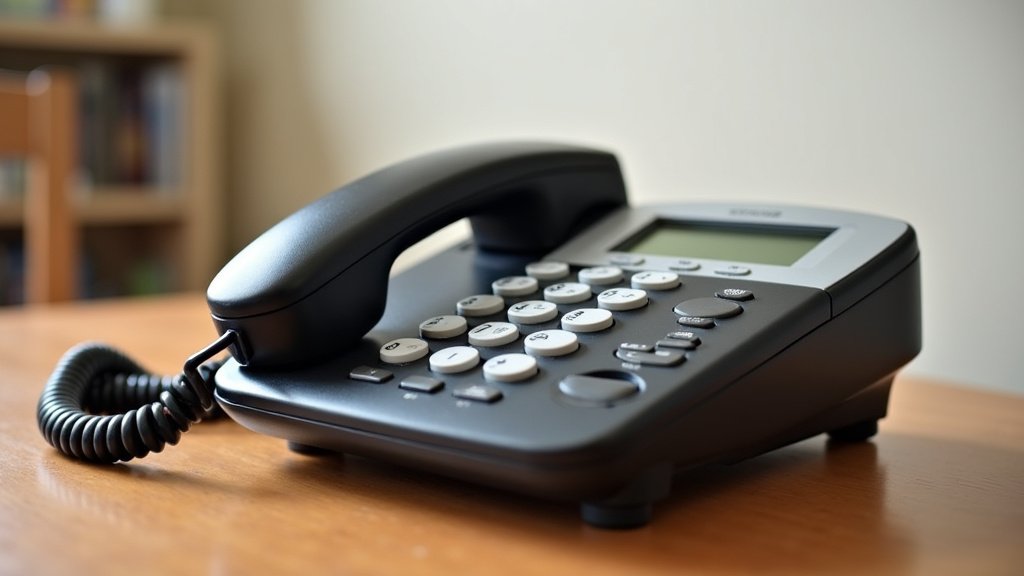
Troubleshooting Common Issues
Even with the best technology, sometimes things don’t work perfectly right away. If you encounter a problem, don’t worry! Most issues are quite common and have simple solutions. We’ve put together a few tips based on common user experiences.
Sound Issues
If you’re not hearing enough sound, or if it sounds distorted, check a few things.
Volume Setting Check
First, make sure the volume is turned up as high as you need it. Double-check the buttons on the handset. Sometimes they can get bumped accidentally.
Handset Connection
For corded phones, ensure the handset cord is securely plugged into both the base and the handset. A loose connection can cause crackling or no sound at all. We found that simply unplugging and replugging can fix many connection issues.
Phone Line Check
Is your phone line working correctly? Try calling another phone to see if the line is active. If you have a landline, sometimes the service provider might have an issue in your area.
Button or Function Problems
If buttons aren’t responding or features aren’t working, here’s what to check.
Power Source
For cordless phones, ensure the handset is charged. If it’s been a while, place it in its charging base. Some phones also have a main power adapter that needs to be plugged in.
Resetting the Phone
Sometimes a simple reset can fix minor glitches. For many models, this involves unplugging the phone from the wall and then plugging it back in. Always check your phone’s manual for specific reset instructions.
When to Seek Further Help
If you’ve tried these steps and are still having trouble, don’t hesitate to reach out for support. Your phone’s manufacturer will have customer service options. They can offer more specific troubleshooting advice. Many manufacturers offer online manuals or support pages too.
Quick Checklist for Daily Use
Here’s a simple rundown to keep in mind:
- Always ensure your phone is charged or plugged in.
- Familiarize yourself with the volume controls.
- Test the sound on a short incoming or outgoing call.
- Keep your phone’s manual handy for reference.
- If you miss calls, check your visual ring indicator.
- Don’t hesitate to ask for help if needed.
Conclusion
You’ve learned that using an amplified telephone is simpler than you might think. These phones automatically boost sound, making calls clearer. You can easily adjust volume and explore other helpful features like larger buttons. We found that the biggest benefit is the peace of mind knowing you won’t miss important conversations. Now that you’re familiar with the basics, you’re ready to enjoy clearer, more accessible phone calls. Take a moment to practice adjusting the volume on your next call to find your perfect listening level.
Frequently Asked Questions
Can amplified phones be used by anyone, or only those with severe hearing loss?
Amplified telephones are beneficial for anyone experiencing mild to moderate hearing difficulties. Even if you don’t have severe hearing loss, you can still benefit from the clearer sound and adjustable volume. Many users find they help reduce listening fatigue during conversations.
How do I know if my amplified phone is loud enough for me?
You’ll know it’s loud enough when you can hear the person on the other end clearly without straining. We suggest experimenting with the volume controls during a call. Find a level that’s comfortable and doesn’t cause distortion or discomfort for your ears.
Are amplified phones complicated to set up?
No, setting up an amplified telephone is generally very straightforward. Most models plug into a standard phone jack and power outlet, just like a regular phone. You can start making calls almost immediately after plugging it in.
What should I do if I can’t hear the caller clearly even with the volume up?
First, double-check that the volume is indeed turned up as high as it can go using the handset controls. If it still isn’t clear, ensure the handset cord is securely connected. You may also want to test your phone line by calling another number to rule out a line issue.
Do amplified phones work with my mobile carrier or only landlines?
Most amplified telephones are designed for landline use. However, there are also amplified phone options for deaf users that can enhance calls on your cell phone. Always check the product description to ensure compatibility with your phone service.